

Description
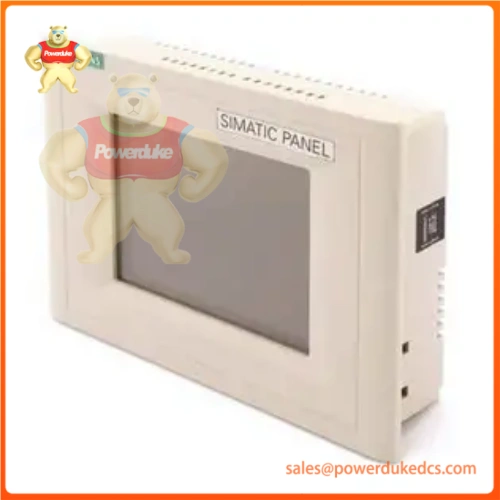
1. Unboxing & Physical Snapshot
- Model & Brand: 6AV6545‑0BC15‑2AX0, Siemens SIMATIC TP170B Color
- Physical Dimensions (Approximate W x H x D): 212 mm × 156 mm × 45 mm (panel‑mount housing; rear depth behind cabinet face)
- Estimated Shipping Weight: 2.25 lb (includes HMI unit, protective face film, inner foam cushion, outer shipping carton; unit net weight 1.55 lb)Industry M…
- What’s in the Box: TP170B color touch panel assembly, protective front‑face plastic film, four metal panel‑mount clamping brackets, OEM printed operating datasheet; CF memory card and communication cables are not included (source cables separately during cabinet retrofits — which prevents commissioning delays on production machine‑tool lines)Industry M…
2. Product Introduction (Structure A – Environmental hook)
This 6AV6545‑0BC15‑2AX0 TP170B HMI operates with front‑face IP65 protection against coolant mist, dust, and light splashes typical on machine‑tool and batch‑processing equipment. Its resistive touch sensor and STN color display endure cyclic cabinet temperature swings, while rear‑side IP20 construction requires full enclosure mounting to shield internal PCB electronics. Peeling or scratching the front protective overlay compromises ingress resistance and accelerates touch‑sensor degradation.
Reliability teams must validate the complete full part number before deploying this spare HMI. Mechanically interchangeable TP170B variants exist with monochrome blue‑scale displays instead of color hardware. A physically‑fitting monochrome unit will mount into the same cabinet cut‑out yet fail to render color‑configured operator screens (a common misstep during urgent production line change‑outs). No project‑software adjustment can convert monochrome hardware to color display performance.
3. Core Technical Specifications
| Parameter | Value |
|---|---|
| Device Type | SIMATIC TP170B color STN touch‑operator panel |
| Display | 5.7‑inch STN color; 320 × 240 QVGA resolution, 16‑color palette |
| Touch Input | 4‑wire analog resistive touch screen |
| User Application Memory | 768 KB available project memorykernal-mul… |
| Expansion | 1× CF‑card slot for recipe / backup storage |
| Interfaces | MPI / PROFIBUS‑DP (RS‑485), RS‑232 printer port |
| Rated Supply Voltage | 24 VDC nominal; 18 VDC‑30 VDC operational range |
| Typical Power Consumption | 6 W maximum |
| Operating Ambient Temperature | 0 °C to +50 °C (vertical panel‑mount installation) |
| Storage Temperature Range | ‑20 °C to +60 °Ckernal-mul… |
| Front‑face Ingress Rating | IP65; rear housing IP20 |
| Configuration Software | ProTool/Lite V5.2+SP2 or compatible engineering toolIndustry M… |
4. Global Compliance & Industry Certifications
- CE Mark aligned with machinery, EMC and low‑voltage directives
- UL/cUL Listed for industrial operator‑interface panels
- CSA certification for North American cabinet installations
- ATEX/IECEx Zone 2 qualification for eligible production lots
UL listing validates 24 VDC power‑circuit safety and front‑panel ingress ratings for shop‑floor deployment. Verify specific lot certifications with OEM.
5. Long‑Term Storage & Asset Preservation Guide
Store this HMI within its original factory carton with foam cushioning intact for warehouse shelf storage. Retain front‑face protective film until installation; do not remove during warehouse inspections. Scratches on the touch‑sensor overlay cannot be repaired in‑field.
Maintain storage‑vault relative humidity below 60 percent, non‑condensing. Sustained high‑humidity exposure degrades the STN display cell and corrodes rear‑side connector pins. Condensation behind the touch overlay creates permanent visual blemishes once powered on.
Exercise caution when stacking inventory atop the HMI shipping carton. Excessive compressive load can crack the front touch glass or damage internal display assembly. No user‑serviceable on‑board lithium backup battery resides within this TP170B unit. Inspect rear connector pins every 18 months for oxidation or mechanical bending.
6. Physical Installation Prerequisites
Insert unit through standard 198 mm × 142 mm cabinet cut‑out and fasten all four panel‑mount clamps evenly; avoid over‑torquing clamps, which can warp the HMI plastic housing. Maintain minimum 35 mm clearance behind the panel rear for cable bend radius and natural convective airflow. Restricted rear ventilation elevates internal temperature and shortens backlight operational lifespan.
Connect 24 VDC power and protective‑earth terminal to facility plant ground bus, never to isolated signal grounds. Secure communication cable shielding to cabinet ground lugs. Confirm the front‑panel gasket seats fully against cabinet sheet metal to preserve IP65 splash‑resistance rating. Replace damaged gaskets before commissioning.
7. Buyer’s FAQ
Q: What Harmonized System tariff code applies to 6AV6545‑0BC15‑2AX0 for cross‑border shipments?
A: This legacy industrial HMI maps to HS 853710 for industrial control operator‑interface assembliesIndustry M…. Customs authorities often require full part‑number suffix documentation. Work alongside your import broker to confirm classification prior to tendering freight.
Q: How does Country of Origin impact audit acceptance for this end‑of‑life HMI spare?
A: Plant audit checklists cross‑reference nameplate Country‑of‑Origin markings with site‑approved asset registers. Parallel‑sourced spares bearing mismatched COO markings trigger formal audit observations, even when boot‑up and touch‑screen functions appear normal.
Q: Should supplementary shipping insurance be purchased for this obsolete TP170B HMI spare?
A: Yes. Transit shock can crack the front touch‑sensor glass, damage the STN display cell, or bend rear‑side connector pins. Many internal defects evade superficial visual inspection. Secure full‑value all‑risk coverage; standard carrier cargo terms exclude damage to fragile industrial display hardware.
Q: Does the delivered 6AV6545‑0BC15‑2AX0 ship pre‑loaded with site‑specific operator project screens?
A: Factory‑sealed OEM units carry base runtime firmware matching manufacturing lot date‑code. Site‑specific HMI project screens, alarm configurations and recipe definitions are never pre‑loaded onto spare hardware. Download, verify and test the complete operator project before placing into live machine‑floor duty.






