Description
1. Unboxing & Physical Snapshot
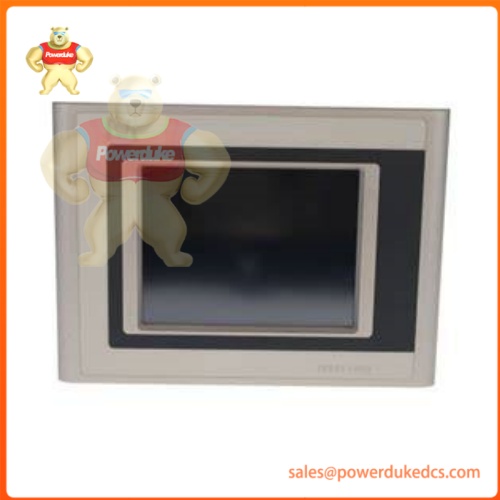
- Model & Brand: B&R Industrial Automation (Bernecker + Rainer) — Power Panel 220 Series Operator Terminal — Part Number: 4PP220.0571-45
- Physical Dimensions: Compact industrial panel-mount operator interface profile (Approx. 210 mm W × 156 mm H × 60 mm D / Net weight: ~1.2 kg to 1.5 kg)
- Estimated Shipping Weight: Approximately 2.1 kg net (Packaged securely in multi-layer anti-static shielding containment, high-density molded protective foam, and heavy corrugated export carton)
- What’s in the Box: B&R 4PP220.0571-45 operator panel unit, mounting clips, pluggable power connector blocks, CompactFlash card slot cover, and manufacturer compliance/conformance documentation.
2. Product Introduction
Structure B (Architecture hook): Engineered for discrete manufacturing, machine automation, and process visualization, the B&R Power Panel 220 (4PP220.0571-45) functions as an advanced operator terminal combining a high-resolution display, integrated resistive touch screen, and robust onboard processing capabilities. Designed to interface directly with industrial machinery and PLC backbones, it delivers real-time visualization, operator data entry, and system supervision in compact plant-floor spaces.
Housed in a ruggedized industrial panel-mount enclosure built to resist heavy vibration and continuous thermal stress, the internal architecture integrates a 5.7-inch monochrome (b/w) QVGA LCD display, onboard memory resources, a Type I CompactFlash slot for data logging and application storage, and an expansion slot for aPCI communication modules.
3. Core Technical Specifications
| Parameter | Value |
| Component Type | Operator Panel / Human-Machine Interface (HMI) with Controller Functions |
| Product Family | B&R Power Panel 220 (PP220) Series |
| Part Number Designation | 4PP220.0571-45 |
| Display Type & Size | 5.7-inch QVGA monochrome (b/w) LCD display with resistive touch screen |
| System Memory | 64 MB SDRAM / 256 kB SRAM |
| Storage Expansion | CompactFlash slot (Type I) for user programs and data |
| Expansion Slots | One (1) aPCI communication / interface slot |
| Power Supply Input | 24 V DC industrial low-voltage power rail |
| Operating Temperature Range | 0°C to +50°C continuous industrial threshold |
| Storage Temperature Range | -20°C to +60°C |
| Enclosure Protection Class | IP65 front faceplate / IP20 rear terminal profile |
| Physical Net Weight | Approximately 1.3 kg (2.87 lbs) |
4. Global Compliance & Industry Certifications
Type-test verification and rigid international electrical standards compliance are mandatory for operator terminals integrated into industrial machinery and automation networks.
- Expected Certifications: CE Mark (EMC and Low Voltage Directives), UL/cUL Listed Industrial Control Equipment ratings, and RoHS material compliance declarations.
- Safety Relevance: Integrated watchdog monitoring circuits, reverse-polarity power protection, and optical isolation barriers prevent data corruption and ensure reliable operator command execution during electrical transients.
- Audit Note: Verify that Automation Studio software project versions, target firmware revisions, and communication card configurations align with your machine architecture specification sheet prior to deployment.
5. Long-Trust Storage & Asset Preservation Guide
Veteran Maintenance Note: Storing delicate industrial HMI panels in unconditioned warehouses requires strict electrostatic discharge (ESD) protection and relative humidity control to prevent display degradation and battery discharge.
- ESD & Moisture Protection: Keep the operator panel permanently sealed inside its original anti-static moisture-barrier bag to safeguard internal microprocessors and touch-screen glass controllers.
- Climate Baseline: Store the inventory in a clean, dry location maintaining relative humidity strictly below 50% non-condensing, and ambient storage temperatures between -20°C and +40°C.
- Physical Preservation: Store units flat or vertically slotted in designated anti-static shelving trays; never stack heavy industrial inventory directly on top of the display bezel to avoid cracking the touch screen or housing frame.
6. Physical Installation Prerequisites
- Ensure that the machine control panel power distribution feeds are completely locked out (LOTO) and verified dead with a calibrated meter before mounting or wiring.
- Prepare the cabinet cutout to exact dimensions, utilizing the supplied mounting clamps to secure an even, watertight gasket seal against the enclosure face.
- Inspect all plug-in power and communication terminal blocks for secure wire retention and clean contact pins prior to re-energizing the system.
7. Buyer’s FAQ (Logistics & Compliance Focus)
- What Harmonized System (HS) code governs international customs clearance?The standard global export classification for this industrial HMI terminal is 8537.10.9170 (Programmable controllers and electrical control system apparatus).
- How does Country of Origin (COO) verification impact machine builder audits?Accurate origin tagging on commercial shipping documents ensures compliance with international trade frameworks and regional plant import regulations (typically Austrian or European manufacturing origin).
- Does this operator panel require software configuration or flashing?Yes, system engineers must download the site-specific visualization project and target configuration files using B&R Automation Studio engineering software tools via the appropriate communication interface.
- What level of transit insurance should be specified?Always mandate fully declared-value, tracked air cargo insurance to protect precision glass displays and internal electronics against heavy drop impacts during international shipment.